• Home page
  • Articles
  • adservio.ro
  • RO
  • Home page
  • Articles
  • adservio.ro
  • RO

Student

Homepage/Articole/Behavior/How do I add a reward to a student?
Popular searches:How do I create an Adservio account?, How do I create a strong password?, How do I recover my password?

How do I add a reward to a student?

71 views 0

  1. In the main menu, select the My Classes module, and then select a class;
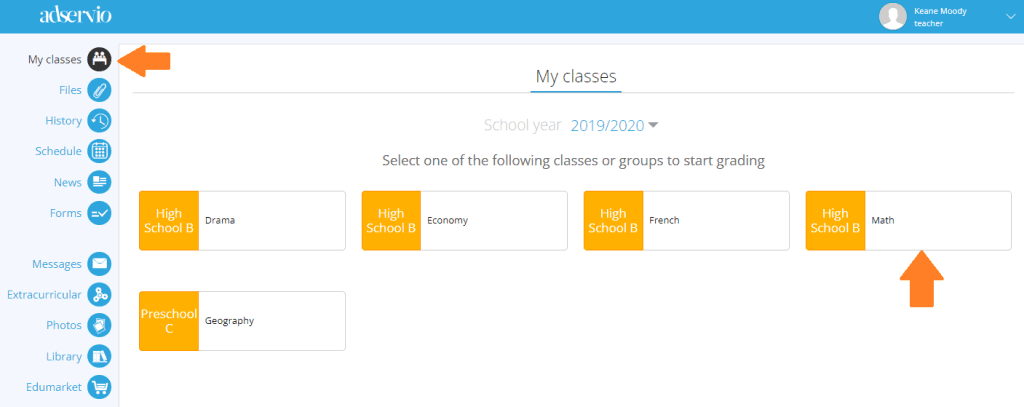
 

2. Move the cursor on the student and click on the Conduct button;


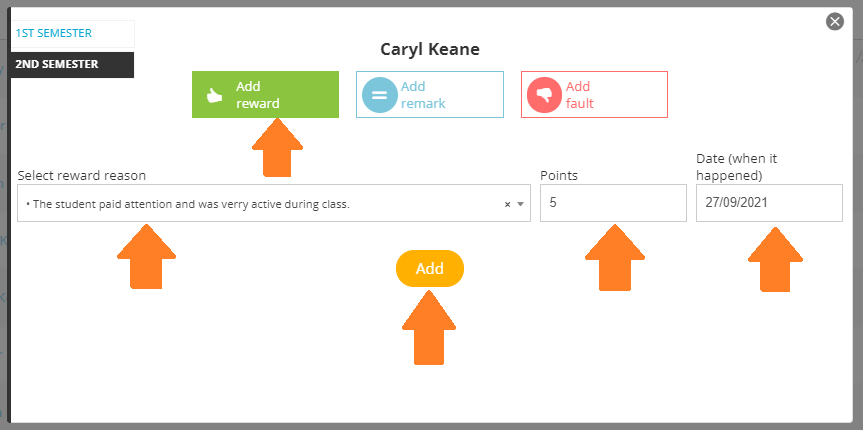
  3. Click on the Add reward button, select the Reason for adding the reward, add the Score, select the Date and click on the Add button;
 

Tags:Teachers & EducatorsTeacher

Was this useful?

Yes  No
Similar articles
  • How do I reset the activity (plusses/minuses) for the whole class?
  • How do I restore a deleted student?
  • How do I grade a student?
  • How do I excuse an absence?
  • How do I import the table containing student and parent information?
  • How do I manually import a new student?

Didn't find your answer? Contact Us

Behavior
  • How do I add a reward to a student?
  • How do I add an observation to a student?
  • How do I add an instance of misconduct to a student?

  How do I add a new student?

How do I check my child’s grades?  

  • © 2021 Adservio . All rights reserved.

Accessibility Adjustments

Powered by OneTap

How long do you want to hide the toolbar?
Hide Toolbar Duration
Select your accessibility profile
Vision Impaired Mode
Enhances website's visuals
Seizure Safe Profile
Clear flashes & reduces color
ADHD Friendly Mode
Focused browsing, distraction-free
Blindness Mode
Reduces distractions, improves focus
Epilepsy Safe Mode
Dims colors and stops blinking
Content Modules
Font Size

Default

Line Height

Default

Color Modules
Orientation Modules
Popular searches:How do I create an Adservio account?, How do I create a strong password?, How do I recover my password?