• Home page
  • Articles
  • adservio.ro
  • RO
  • Home page
  • Articles
  • adservio.ro
  • RO

Configs

Homepage/Articole/Secretary/Configs/How do I edit a school subject?
Popular searches:How do I create an Adservio account?, How do I create a strong password?, How do I recover my password?

How do I edit a school subject?

177 views 1

The school subjects in the Nomenclatures module are assigned solely to the educational establishment where they are being viewed. As such, all edits and additions apply only to the educational establishment in question. To edit a subject on the list, follow the steps below:

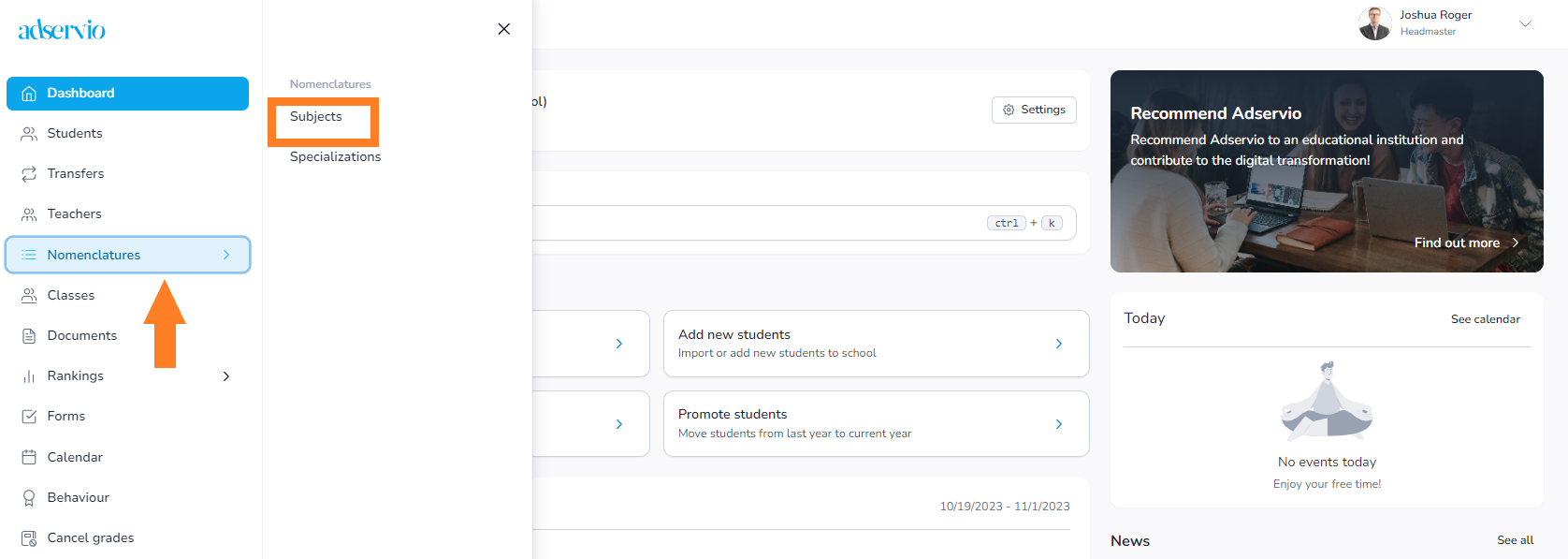
In the main menu, select the Nomenclatures module, then the Subjects section and click on the Edit button next to the subject you want to modify. 


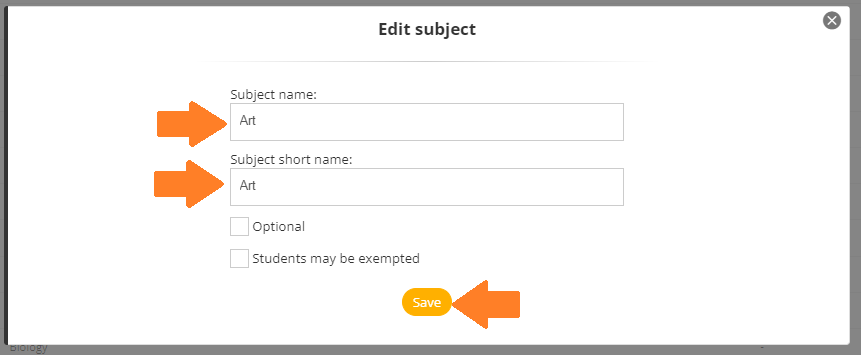
Edit the Subject name field and choose whether the subject is an elective or students can be exempted. Click on Save. Later, you will able to find the subject on the main list, in alphabetical order.

Note: Checking the above-mentioned option will allow students to be exempted from the subject for long periods of time, such as an entire semester or school year.


Tags:Secretaryheadmaster

Was this useful?

1 Yes  No
Similar articles
  • How to send registration codes to students and parents
  • How do I promote students to the next school year?
  • How do I restore a deleted student?
  • How do I excuse an absence?
  • How do I delete a student?
  • How do I add an educator?

Didn't find your answer? Contact Us

Configs
  • How do I edit a school subject?
  • How do I edit an educator’s personal data?
  • How do I edit a student’s personal data?
  • How do I add a new class?

  How do I customize my account?

How do I edit a student’s personal data?  

  • © 2021 Adservio . All rights reserved.

Accessibility Adjustments

Powered by OneTap

How long do you want to hide the toolbar?
Hide Toolbar Duration
Select your accessibility profile
Vision Impaired Mode
Enhances website's visuals
Seizure Safe Profile
Clear flashes & reduces color
ADHD Friendly Mode
Focused browsing, distraction-free
Blindness Mode
Reduces distractions, improves focus
Epilepsy Safe Mode
Dims colors and stops blinking
Content Modules
Font Size

Default

Line Height

Default

Color Modules
Orientation Modules
Popular searches:How do I create an Adservio account?, How do I create a strong password?, How do I recover my password?